Custom Search

Selasa, 14 Januari 2014

How To Place Pending Orders To Generate Maximum Profits

Pending order is the client's commitment to the brokerage company to buy or sell a security at a pre-defined price in the future. This type of orders is used for opening a trade position provided the future quotes reach the pre-defined level. - Metaquotes Software Corp.
Pending orders are strategic order types with high rate of accuracy, safety, and profitability if applied correctly. Virtually all successful Forex systems utilize pending orders especially News Trading Systems.

See some of our Trading Strategies that utilizes pending orders - How To Make 40 - 50 Pips Consistently. Basic Method & Advanced Method


You can think of pending orders like traps that are set to take advantage of certain kinds of market patterns, conditions, and price actions.

Before we learn how to place pending orders lets see the different types of pending orders, and what they mean.

Buy Stop — Technically this means place a buy order provided the future "ASK" price is equal to the pre-defined Buy Stop Value. In otherwords this order will only be triggered when price increases or hits the Buy Stop Order Value from below. Buy Stop Orders are set in anticipation that price will continue to go up or change direction and move upwards.


See what happens next


Sell Stop — Unlike the Buy Stop Order, the Sell Stop is used to place a Sell order that would be triggered provided the future "BID" price is equal to the pre-defined value. It is set in expectation that price would fall from a high point or current price level, and would continue to go down.


See what happens next


Buy Limit — This means place a buy order in anticipation that the future "ASK" price would be equal to the pre-defined Buy Limit Order Value. In this case the current price level is higher than the value of the Buy Limit Order when it is placed. Buy Limit Orders are used in expectation that price, having gone down to a certain level, will eventually increase.


Sell Limit — It means Sell an order provided the future "BID" price is equal to the pre-defined value. Here the prevalent price level is lower than the value of the placed Sell Limit Order. Sell Limit Orders are usually placed in anticipation that price having moved consistently upwards to a certain level, will certainly fall.


BASIC FACTS & CONDITIONS TO NOTE ABOUT PENDING ORDERS
1. The right market pattern, and conditions must be identified before setting pending orders. E.g Is the market struggling around support/resistance areas? Is the market showing signs of an eventual breakout? Chart patterns, sideways market, Pre-news waiting period, e.t.c. These are some major kinds of market conditions that are right for setting pending orders.

2. Use analytical and trending tools to help as a guide in setting pending orders. This would help you set them at the best points.

3. Setting accurate pending orders is a skill every Forex trader should develop in Forex trading. It requires constant practice, and study of market behaviour. Forex Simulation Tools comes handy here. Use them to study market patterns, and test the best places to set pending orders.

4. It is safer to use scripts like OCO (order cancels order) to prevent whipsaws or reversal spikes during news release when setting pending orders.
5. Use expiry dates to set pending orders less you forget to delete them, and they get triggered later in the future at the wrong time.


6. Prepare your pending orders at least 20 minutes early before the event. You can use the Alert feature in MT4 to set warning alarms that will update you of price movements as the market progresses within the areas of your pending order.

7. Pending orders most often get a better fill than market orders. However due to high volatility, and spread widening by most brokers during news release, you might not get the best price fill.

8. You can set as many pending orders as your platform or broker can take. But do not overload your account to the extent beyond your margin, and money management rules.

9. Using simultaneous BUY Stops and SELL Stops for News Trading is an ideal way of taking advantage of either outcome of the news release.

10. It is quite difficult for "bad" brokers to hunt or manipulate pending orders. The worst scenerio is that they would widen the spread to an abnormal level.

11. Consistently adjust your pending orders as market progresses in order to keep price in a narrow channel. This is very good for breakout strategies.

12. Pending orders are held in the broker's server, and not on the client application (MT4 Platform). So if you close your platform or disconnect from the internet, the order would still be triggered when all conditions are met.

13. The new MT4 Build 509, and MT5 has a One-Click-Order feature, where you can right click on any area of your chart to set pending orders.


HOW TO PLACE PENDING ORDERS
Placing pending orders is not difficult as some traders assume. Infact you stand a better chance to modify or cancel a pending order if you later discover your calculations were wrong or if market suddenly changed but the order has not been triggered. You cannot do this with a market order.

Using technical methods or tools is one of the best guides to placing accurate pending orders.

1. You must understand that pending orders works like a trap, hence it should be set in a manner with high anticipation that market would eventually fall into the trap. One of our proprietary trading strategy relies on this concept.

2. Look for best areas where price would eventually breakout, test, or reverse, and give careful space above or below those areas and set the pending order at that location. For example if i anticipate that price would reverse upwards after falling down to a certain price level, i would set a Buy Stop Order 5 or 10 pips above the forcasted price level area where price would likely reverse. The new MT4 Build 509 and MT5 has a One-Click-Order feature, where you can right click on any area of your chart to instantly set pending orders easily.

3. Enter the take profit and stop loss settings in the pending order window. With the new MT4 Build 509 or MT5 you can drag the TP and SL lines directly on your chart to modify their positions.

4. Resistance & Support Lines
Resistance and support lines are very good tools that aids setting accurate pending orders. Price tends to rebound or reverse around support and resistance areas. You can take advantage of this by identifying those areas through the use of resistance and support lines. After drawing the line, set your pending orders right at the location of the line. For example if price is likely to bounce off a support line, and move upwards, i would set a Buy Limit Order at the support line in anticipation that price would go up after falling to that level on the support line. For a resistance case (i.e price is hitting a particular level and not going further but rather reversing), I would use a Sell Stop Order to take advantage of it. This means i am anticipating that price would go down after climbing up and reaching the resistance price level or line. The take profit should be set close to the oppposite resistance or support price level. You can also use Pivot Point Indicators or Fibonnaci to determine the Take Profit and Stop Loss Levels.
5. Trendlines
Trendline is another fantastic tool, which you can use to set accurate pending orders. You set the pending orders at the location of the likely breakout areas of the trendline.


Be assured that when you apply these tips, you'll definitely maximize your profits. We appreciate your suggestions and feedback.

Happy Trading.


Jumat, 10 Januari 2014

Analyzing EA Backtest Results With Monte-Carlo Analysis - StrategyQunat EA Analyzer

This article is an extract from the makers of StrategyQuant EA Analyzer. The article deeply explains Monte-Carlo Analysis Analytical feature, which shows the true profitability of an expert adviser or trading strategy.

StrategyQuant EA Analyzer is a free product. Download it here

What is Monte Carlo Analysis and Why Should You Use It?
Monte Carlo analysis (or simulation) is a technique that can help you estimate the risk and profitability of your trading strategy more realistically. 

Why Should You Use Monte Carlo Analysis?
http://www.strategyquant.com/eawizard/#a607174
Design EA With Ease
Historical results of a trading strategy give us some prediction of the future performance. By using Monte Carlo analysis you'll be able to make this predicion much more accurate.

To put it simply - Monte Carlo results will give you the estimated performance of your system based on statistics. It can help you decide if your strategy is robust, what profit / drawdown you can expect from your strategy and if you should trade this strategy at all.


What is Monte Carlo analysis?
The basis of Monte Carlo method is running the same simulation a number of times, each time with small random changes. The higher the number of repetitions, the bigger is the statistical significance of the results. 


An example - changing the order of trades
http://www.geneticbuilder.com/#a607174
Backtest is usually only a simple list of trades. What can be randomized about that? 

For example order of trades. The order of trades in the past is relatively random. If your system has profitability 60% then you can expect that it will have 60% profitable trades and 40% losing trades, but you cannot expect in which order they'll come.

By simply reshuffling the trades your final profit will stay the same, but your drawdown can change a lot. Instead of drawdown 10% you might end with drawdown 30% just by changing the order of the trades. So which value should you trust? What should you expect in the future? 

The answer lies in statistics, which is the basics of Monte Carlo. You can let a program run this reshuffling a hundred times and you'll see what is the best, worst and average drawdown achieved during these random runs.

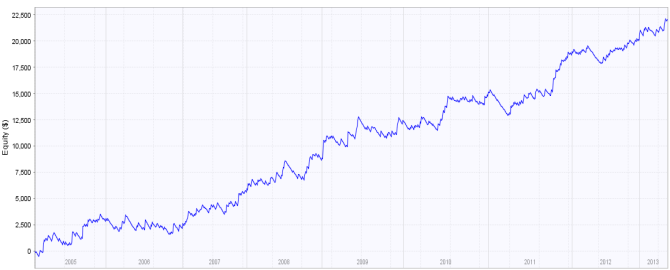
Take the following system: 


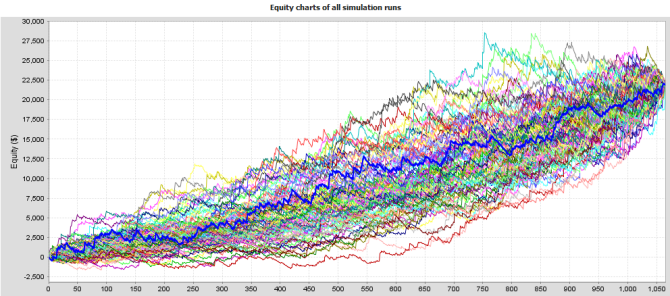
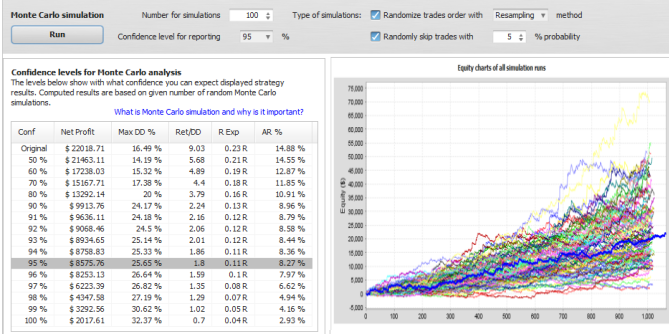
Below is 100 diffrent equities of the same system. All we did was change the order of trades.  


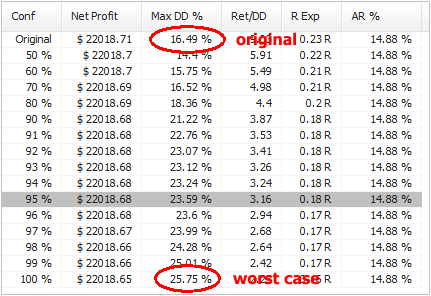
And here are some system performance statistics:


The system that originally had drawdown around 16 % now in worst case has drawdown 26 %, almost a double. 

What do these values mean?
It is quite simple. The first line is result for original
http://www.quantstrategyea.com/#a607174
strategy, the rest are confidence levels computed using Monte Carlo analysis. Numbers on the left are confidence levels - they tell us with what confidence (probability) we can expect the resuts to be same or better than in a respective line.

For example, values at 95 % confidence level mean that there is 95% chance that Net Profit, Drawdown, etc. will be same or better than the confidence level values.

In other words, there's only 5% probability that drawdown will be worse than 23.59 %. 


95 % is the usual confidence level to consider. You could realistically expect that your system results will be same or better that values in this confidence level.


What properties can be tested in the Monte Carlo analysis?
When we work with the backtest results all we have is a list of trades in the history. What can we do with them? 

Changing Trades Order

http://www.strategyquant.com/tickdatadownloader/#a607174
In the Exact variation it only randomly shuffles order of the trades. This doesn't change the resulting Net Profit, but it is very useful in examining different variations of Drawdown that can be a result of different order of trades.

In more advanced Resampling variation of this test the trades are not just shuffled. Instead the program randomly picks total number of trades from the pool of all trades in history. The difference is that in this method the list of trades might not be the same. It can pick one trade multiple times and some other trade might not be picked at all. 

This will give yet another view of the system. This method will usually change both Net Profit and Drawdown and it is quite extreme test. 

Skipping Trades

in this test some trades will be randomly missed (with given probability). In real trading you can often miss a trade because of platform or Internet failure, or simply because you paused trading for some time.

This test will give you an idea how the equity curve might look like if some trades are randomly skipped. 


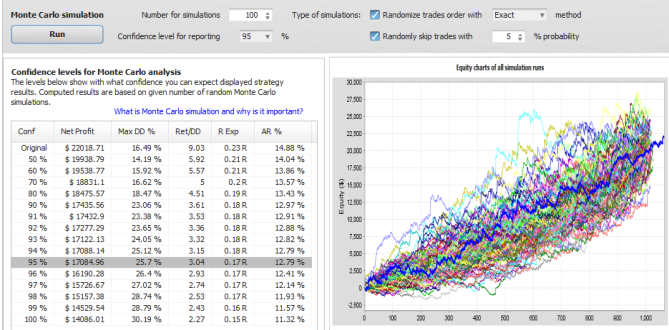
Example 2 - lets randomize the trades and miss 5% of them
You can see the resuts below. Missing 5% trades will slightly increase our expected drawdown at 95% confidence level and it also reduces the expected profit from $22.000 to $17.000.


Example 3 - resampling the trades and miss 5% of them
This is the most extreme test - with trades not only changing order but also resampled and missed 5% trades. The expected drawdown is the same as in previous example, but expected profit at 95% confidence level is decreased to only $8.500. 

Note that this is almost the "worst case" scenario, it means that there's only 5% chance that the profit would be lower than this. 

It can also be higher, if you'll look at the siulations chart you'll see that the simulations equity results have wider range in this case, the final profit ranges from only $2000 to $50.000.

We can hope for the best but be prepared for the worst. 


Practical use of Monte Carlo analysis

This anaysis should be one of the final steps in strategy development. Before you start trading any strategy you SHOULD run a Monte Carlo simulation with at least Exact randomization and 5% trades missed to determine more realistic drawdown and profit expectations. 

What to look for - from my personal experience: 

Expectancy level and number of simulations - it is a good rule of thumb to watch 95% expectancy level and run at least 100 simulations. More simulations will give you more statistical significance and 95% level means that there is only 5% chance that results will be worse than simulated. 

Drawdown - you should watch how much worse is the drawdown at your expectation level compared to the original strategy. If it is less than double it is usually acceptable for me.

If drawdown at 95% level is double or even more than drawdown of original strategy then trading this EA would be dangerous.

It means that it achieved small drawdown in your test mostly by luck and you shouldn't expect the luck to continue in the future. 

Net Profit and other - generally, the strategy should fulfill your expectations. You can expect resuts better than 95% level values, but you can never be sure how much better they'll be.

For example, I wouldn't trade a strategy that would have none or very small small profit at 95% - it means that there's something wrong with the strategy. 


Note: Monte Carlo functionality described above is available in the new EA Analyzer 2
You can use it to run Monte Carlo analysis on your MetaTrader4 backtests or account history statements imported to EAA.


Kamis, 09 Januari 2014

Trading Tip #2: Advanced Method On Making More Than 40-50 pips Consistently with MA Combinations

I wish to appreciate the comments, and encouragements  from users of the first trading tip #1. I decided to speed up the publishing of the advanced method due to high demand from interested users. However we advise traders to completely understand the basics of this system before attempting the advanced method. This is the reason we gave time for practice, and tests before the release of the advanced method.


--> In the first method we were able to prove that PRICE WOULD ALWAYS REACT AT A PARTICULAR AREA, and you can convert the reaction to your favour by setting a price trap within the reaction points.

A simple reaction can earn you at least 40 to 50 pips consistently each time it occurs (all things being equal).

The advanced method reveals some tricks, and tips to increase the profits, and helps to detect the reaction areas clearly. But before we commence i strongly advise you read the first method and practice it with a simulation software (recommended) or demo account until you get a full understanding of the strategy.


KEY POINTS OF THE ADVANCED METHOD
  1. The advanced method primarily increases the profit potential of the strategy.
  2. Additional indicators (optional) would be introduced to aid easier detection of the reaction points, and show best places to set pending orders.

PRACTICE/TESTING MATERIALS
  1. Forex Simulation Software. Forex Tester V2.0 Professional Edition was used to practice and test the
    http://www.forextester.com/idevaffiliate/idevaffiliate.php?id=687
    strategy. You can download a demo version (with limited features) for this lesson before you decide to purchase the full edition.
  2. Offline Chart (30 Mins). We do not necessarily need a demo or live account for this lesson. Right click your chart, and select properties from the menu. Select the common tab, and choose Offline Chart. Click ok.

ADVANCED METHOD OF MAKING MORE THAN 40-50 PIPS
Now lets imagine we have a strategy with 85% to 90% accuracy, and another strategy with 58% to 99% accuracy. It would be better to take more risk or increase our chances with the first strategy because out of every 10 trades we are sure of 85% minimum success compared to 58% minimum success despite its ability of achieving 99% accuracy in some runs. A trading system with 85% to 90% accuracy is worthy of taking risks but with intelligent techniques.

We said before that this strategy detects areas where price MUST REACT, and we take advantage of this reaction no matter how it reacts. This means if we get 50 reactions a day (all things being equal), and we take advantage of them using this tactics, then we should expect 100% positive returns.

The first basic strategy only showed us how to detect the areas, and how to take advantage of it by placing pending orders, but the advanced system would show us some indicators that would strengthen the detection of the reaction points, and how to multiply the profits.


**New - 50% Discount Plus Special Life Time Discount Offers

Advanced Method Step 1: - Eagles Eye Detection
We are going to apply some indicators to strengthen the detection of the areas where price would always react. The basic strategy depended only on the 200 SMA line.

Pic 1


Now we are going to apply some key indicators that would give us clear signals that price is actually playing around the trap area, which is within the 200SMA line. This will help us detect fake setups. 

Force Index Indicator
The force index indicator is grouped under the Oscillator Indicator. It connects the basic elements of market information such as price trend, its drops, and volumes of transactions. This indicator when combined with the Moving Average Indicator produces better results in opening and closing orders (Click to see more about Force Index Indicator).

Open your offline chart and apply the indicator with its default settings. Resize your chart where necessary.

Scroll backwards or forward on your chart history, and look for areas like the picture 1 above where price is crawling along the 200 SMA line. At those areas where price is crawling along the 200 SMA line you will notice that the Force Index Indicator is somewhat on a straight line at the 0.00 level. See illustration below


This means that the volume of transactions with regards to the bulls and bears power is indecisive. This also means that price would eventually breakout either to the bull or bear area. THAT IS THE REACTION. Price would never remain indecisive forever so the Force Index Indicator gives us more confidence to set our trap, and wait for an eventual breakout.

NB: The longer the force index stays at the 0.00 level the better the certainty of the reaction.

GBPJPY 30Mins - 30th August 2013; 19:30


RVI Indicator
The Relative Vigor Index Indicator helps to verify trend, and
https://tradingfxvps.com/whmcs/aff.php?aff=5&url=http://tradingfxvps.com
trend breakout. It is already part of the basic strategy but we are going to see how it will helps us filter the detection.

Take a look at the chart in the same area, and see how the RVI reacts. You'll find out that when price crawls around the reaction areas, the RVI is either fluctuating within the 0.025 level and -0.025 level or on the 0.00 level. Anything outside these levels is not guaranteed. The RVI plays lesser role when compared to the Force Index but its still useful.

In addition to these indicators you can include the Alligator Indicator. The indicator as we know it squeezes around price when it begins to move in a sideways pattern or in a channel due to inactivity. 

Either of these indicators helps to further strengthen the signal that price is actually crawling around the reaction area waiting for an imminent breakout.


Advanced Method Step 2: Multiply The Profit
The primary goal of the advanced method is to multiply the profit potential of this strategy. 

The steps below involves some risks that may not be suitable to some account size, type, and broker. This is why we recommend using a simulation software to practice, and test this method in order to optimize it to your account size and money management rules.

Step 1:
When all conditions are met place 2 pending orders on both sides with different lot sizes. The orders should be placed simultaneously.

For example:
Order 1 - BUY STOP - Lot Size = 10.00
Order 2 - BUY STOP - Lot Size = 20.00
Order 3 - SELL STOP - Lot Size = 10.00
Order 4 - SELL STOP - Lot Size = 20.00

Take profit should be placed in this manner:
1. The higher lot size should have a closer Take Profit setting.
2. The lower lot size can have its TP set farther than the higher lot size or at the same position.

NB: A safer way is to place the higher TP much closer like 10 pips away from the order. But If the signal shows a major reversal or cross then you could increase it. The idea is to catch as fast as possible the immediate reaction with the higher lot size, and consolidate your position with the lower lot size. Take note of FIFO and Hedging rules for brokers situated in the US.

The inherent risk is that price can suddenly counter react against your position hence you should be careful trading the advanced method prior to news release. However our confidence lies on the basis that PRICE MUST REACT and 80% of this reaction showed positive returns if applied accurately.

Warning: Please practice, and perfect this method with a simulation software before applying it to your live account. You will not be able to carryout an extensive practice, and testing of this strategy with a demo account. Also be cautious of your leverage and margin size.

Step 2:
Place 1 (one) single large order rather than placing multiple
orders with different lot sizes. The question is what happens if the order doesn't get to my Take Profit or reverses negatively? Personally i use Trade Management Systems like Managed Take Profit EA to protect my orders from situations like this. The system takes partial take profits from my account, while automatically moving the Stop level till it gets to breakeven.

We've come to the end of the advance method of making more than 40 - 50 pips consistently with MA Combinations. We hope you'll find it useful to your success in Forex. 

We appreciate your feedback, and comments. 


    Jumat, 03 Januari 2014

    2014 - Best Year Ever


    With gratitude to God Almighty for His protection, provision, mercies, and grace, we wish to welcome everyone to 2014 - a year filled with expectations, promises, surprises, positive changes, harvests for hard work, and new things.

    2013 was quite an interesting year. It was the year FXTradeCity was founded, and we are glad we lived to our expectations and goals. Thanks to God Almighty and to you all who made it a success.

    2013 was a year of shocking, and breaking news especially with the big shots in Forex. 
    1. FXDD got fined by CFTC for unilaterally removing clients profits. 
    2. Binary Options also got serious injunctions from CFTC.
    3. InvestTechFX Technologies Incorporated got arrested by Royal Canadian Mounted Police for allegedly defrauding clients millions of dollars
    4. MF Global Inc got one of the record breaking fine of $1 Billion dollars as restitution to their clients, and an imposed fine of $100 Million dollar penalty through a court verdict for their failure in 2011.
    5. Fund Manager - Green Tree found themselves a 97 Months Jail Term and $17 Million to be paid back to clients
    6. One of the big giants in online payment system - Liberty Reserve was shut down, and the founder arrested.
    These and so many other shocking news rocked the FX Market in 2013. 

    2013 also ushered amazing business buy overs, and mergers we never imagined would happen. Blackberry (RIM) sold out its cherished BBM App to the open market mainly to Android Phone Makers due to alleged bleak prospects for its handsets. 

    Nokia Investors approved sales of its handset units to Microsoft unshackling the Finnish company from the unprofitable division, and letting it focus on networks.


    Facebook almost acquired one of their biggest acquisition if they had bought SnapChat but the deal didn't pass through.

    These and so many other shocking mergers, and buy-out occurred in 2013.

    The above shows the deep appetite, and business competition in 2013, which would definitely cause more ripple effects in 2014.


    RESOLUTIONS FOR 2014
    I bet a lot of traders must have resolutions for 2014. However we have a some advice, and tips for this year.
    1. Commit your heart desires for this year into God's Hands, and He'll see you through.
    2. Do not procrastinate this year. Highlight your targets, and get them done timely.
    3. Take the necessary risks, and put away fear because it denied you opportunities in 2013.
    4. Dedicate some of your budget to training software & utilities this year.
    5. Expand your frontiers.
    6. Dont be on the sidelines this year - act.
    7. Grow from your current level to a higher level (Baby trader to Advanced Trader).
    8. Kill all the killing habits, and attitudes this year (greed, laziness, psychological imbalance, e.t.c.).
    9. Resolve to let go off bitterness, and forgive yourself for last year's failures. You are not a failure - Move on.
    10. Do not chase after the wind. It was not worth it last year, be realistic.
    11. Don't forget to signup for our newsletters, and like us on Facebook

    Wish You The Best In Your Forex Investments
    Yours Sincerely

    Obike C. Onyebuchim

    Minggu, 22 Desember 2013

    Commercial Network Services VPS Provider - Updates


    CNS Forex VPS Provider is one of our top 5 VPS Providers. We got an important email updates on their services, which we like to share with you especially for those considering a Forex VPS Provider. The updates covers new features, services, and improvements on their VPS Technology. Take note of the bundling program for 5 new brokers. 

    We'll keep you updated on changes to these updates.

     
    RE: CNS SUBSCRIBER UPDATE - December 2013
    • Two-factor Authentication UPGRADED!  - Our 2FA has been upgraded to provide changing codes from a mobile application instead of waiting for SMS and we have extended protection to the CNS Client Area.  Now available by subscription for servers off the  CNS network!  Activate 2FA now to secure yourself from emerging threats
    • New Emergency SMS Contact Numbers - Save our emergency SMS contact numbers in your mobile phone now so you can reach our Help Desk in the event of an emergency in your area
    • New ON NET Connections - more brokers have direct connected to the CNS network to provide you with a low latency and high redundancy connection.
    • New bundling brokers: We are welcoming five new FOREX brokers into our VPS Bundling program - can you get a free or discounted CNS VPS?
    • UK datacenter migrating to LD5 - We are moving our UK datacenter into Equinix LD5.  Many more ON NET connections on the way
    • Windows 2012 R2 now available with vRSS! : Learn about the benefits of 2012 R2 (Win 8.1) and how to get it
    • CNS Remote Admin update 1.0.17: Manage the health of your VM and control Autoboot from your PC or mobile device with CNS Remote Admin.   v1.0.17 just released!
    • Autoboot updates: Are you still running an older version of Autoboot? 3.0.35 is now available.
    • Autoboot/2FA Software Bundle - Already have an Autoboot software subscription?  Add 2FA free for six months until January 31, 2014
    • DNS manager update: The DNS zone manager in our client area has been upgraded to make your zones easier to manage
    • Google Checkout gone, Bitcoin now accepted! : We now accept Bitcoin, to replace Liberty Reserve, Perfect Money and Google Checkout.  Includes a list of all payment options.
    • Coming Soon : A peek at what we are working to bring you in the future
    • Happy Holidays : We hope you have a fantastic holiday, and we look forward to working with you in 2014.

    Two-factor Authentication Upgrade:
    In previous subscriber updates, we told you about a strong increase in RDP hacking robots coming from the Internet.  That threat was successfully mitigated when we changed our default configuration to randomize RDP ports.  Unfortunately, new and even more dangerous threats are appearing and specifically targeting the online trading community.  This makes it that much more important for all traders and trader services to employ stronger authentication than the traditional user name and password.  Traditional user name and passwords are commonly compromised by malicious software, or from hacked web sites in which the victim has used the same password.  Hacked email accounts are also a common source of further compromise.

    CNS Two-Factor Authentication (2FA) is a system where two different factors are used to authenticate a system login. Using two factors as opposed to one delivers a higher level of security when authenticating your login. The CNS 2FA solution combines something you have - your mobile device (phone or tablet) - with something you know - your control panel or VPS password. This can be compared to using an ATM card to withdrawal funds where you are required to have both the card and the PIN to complete a transaction, though in that example your ATM PIN may rarely change and the 2FA PIN is changing every 30 seconds.

    Previous versions of CNS 2FA were only available with CNS VPS subscriptions and required a one-time PIN code be sent to the subscriber by SMS. Due to the variety of mobile providers worldwide and the different methods they use to process SMS messages, SMS PIN's could sometimes be delayed by several minutes.  Some countries even restrict commercial SMS deliveries to working hours.

    With the release of CNS 2FA v2.5, CNS is introducing software tokens for mobile devices. The software displays a changing code on the mobile device, which only needs to be added to the end of the password at VPS login. This avoids the need to wait for a SMS delivery. For subscribers without a modern iOS, Android, or Windows mobile device- SMS codes are still supported. Note: The ability to receive the one-time PIN by email is no longer supported because of security risks (email accounts are often hacked before any other services the victim may subscribe to).

    2FA renders key loggers ineffective because the PIN code changes every 30 seconds- for token generated PINs and 5 minutes- for PINs sent by SMS (can only be used one time). A stolen password is only 1/2 the information needed to login - the attacker must also have your mobile device in their hand to read the PIN code and enter it. Brute force hacks are out of the question.

    All that is needed is a software application installed in your mobile device to display the codes.  There are already three that we know of which will work:  Google Authenticator, Authy and OTP Authenticator.

    CNS 2FA is compatible with Google Authenticator, Authy and OTP Authenticator.
    We strongly recommend this free service to all subscribers. To date, CNS has not seen a single 2FA protected VPS hacked. CNS is taking security even further by extending the 2FA service to protect CNS Client Area logins.

    CNS Two-Factor Authentication (2FA) is compatible with any hosted Windows server, and has been tested on Windows 2003 R2, Windows 2008 R2, Windows 2012 and Windows 2012 R2. It is available free with every CNS VPS subscription, and is also available by subscription for Windows servers off the CNS network. 

    How to install 2FA:Installing CNS 2FA is detailed in the CNS Two-factor Authentication How-to Guide.


    [Top]
    New emergency SMS contact numbers:
    We have made permanent a SMS gateway to our Help Desk for your use during emergencies in your area.  The service was first introduced during Hurricane Sandy in 2012, enabling subscribers who were without power to reach our Help Desk.  Since then we have been sending targeted messages to subscribers in areas preparing for major storms with information about the SMS service.  With all the commotion of preparing for the storms, these messages have at times arrived too late to be read by the subscriber.  There is of course also the possibility of an unexpected disaster preventing us from alerting you to this alternate contact method.  And so we ask that you save the number in your mobile phone now, for your use during a power failure or other emergency in your area later. SMS is ideal because it does not utilize jammed voice lines, will continue to try getting messages thru and also uses very little battery compared to voice.

    Please save these numbers in your mobile device now so you will have them later if needed. Upon receipt, CNS will acknowledge your message and interact through SMS to assist you. For faster service, please include your email address in the message.

    In the UK: +44 1872 672038

    All other regions, worldwide: +1 858 633-8999

     
    New ON NET Connections:  ON NET
    More FOREX brokers have connected to CNS via ON NET.  ON NET is a direct and private connection between the CNS network and your broker (or other provider's) network for low latency and high redundancy.

    In a typical hosted environment, IP traffic must travel between the VPS provider's network and thru the network(s) of commercial IP providers, who route and deliver the traffic to the remote network.  Even for short distances where end to end latency is typically very low, it can sometimes result in periods of high latency or even disconnects due to congestion at public peering points, or service issues that may temporarily route the traffic over a much longer distance - even when both sides are in the same datacenter.

    With ON NET, traffic does not route through the public Internet - both sides are "on the network", with the Internet always available as an immediate backup route for high redundancy.   We have established points of presence (POP) to CNS ON NET in 51 different datacenters in the US and UK.  ON NET POP's are connected to the CNS network by a direct and private fiber-optic connection, bypassing the Internet and its inherent problems completely.

    By connecting their network to ON NET, providers are demonstrating their commitment to provide you with outstanding quality of service.  Every broker, signal provider or other entity with mutual subscribers on the CNS network is invited to connect to our ON NET POP near them to provide low latency and high redundancy to subscribers on the CNS network.  Utilizing ON NET connectivity does not require any special software or settings - it's completely transparent to CNS subscribers. If you are trading with any of these brokers in our NYC datacenter then you are already ON NET with them right now.**

    The following brokers are ON NET with our New York City datacenter:

    ATC Brokers
    AxiTrader*
    Capital One Forex
    CMS Forex
    Direct FX Trading Party
    Excel Markets
    Finotec (UK)
    Forex Nation*
    FX Salt*
    Gold Goat (New Zealand)
    Graalia
    Integral**
    International Capital Markets (Australia)*
    Invast*
    Pepperstone*
    PrimeXM
    Real Forex (Israel)
    Sensus Capital Markets*
    SmartTradeFX
    Which Way FX

    *bundling partner -  keep reading
    **Integral requires that you contact your account representative in order to enable the ON NET connection

    ON NET brokers may display the ON NET logo on their web site.  They will also be indicated on our
    latency chart.  If you would like your broker to connect with ON NET, please contact them and let them know!  We will be happy to work with them and get them connected. 


    [TOP]

    New Bundling Brokers:
    We are pleased to welcome Core Liquidity Markets, Invast, Sensus Capital Markets, Sterling Gent Trading and Forex Nation  to our growing list of brokers sponsoring a CNS VPS for their traders.  The CNS VPS Bundling program allows brokers to include a free or discounted CNS Trader's VPS with their customer accounts by sponsoring all or part of the CNS subscription fee that is invoiced to the trader by CNS. The CNS VPS subscription remains the property of the trader while enabling the sponsoring broker to post credits directly to the subscribers renewal invoice to offset or pay the renewal fee in full. Each broker has their own program terms to qualify for sponsorship.

    If you would like to apply your CNS VPS subscription to a brokers bundling program then please open a CNS support ticket and provide the coupon code as listed below. If your broker is not yet a member of our bundling program then please ask them to join! More information for brokers about our Bundling program for brokers can be found
    here.

    The most current list of brokers participating in our bundling program can always be found in this knowledge base article.   More brokers are on the way - stay tuned!

    The following is a list of our Broker Bundling members and their respective program details as of December 19, 2013:
    Broker Terms Coupon Code Datacenter/Latency
    axitrader

    Regulator:  ASIC [AU]
    Each month, AxiTrader will credit up to $35.12 of the monthly CNS VPS fee for customers who trade over 100 lots in a calendar month regardless of your account balance. (Value edition Traders VPS with 896MB of RAM). Please contact service@axitrader.com.au or +61 2 9965 5830 for further information/requests. AXITRADER ON NET
    NYC
    divisa

    Regulator:  FMA [NZ]
    Each month, you will be credited up to $35 of the monthly fee for a CNS VPS if you have traded more than 100 Standard Lots (round turn) within the previous month. (No minimum balance maintenance requirement.) BNFX NYC/1ms
     
    Regulator:  ASIC [AU]
    Core Liquidity Markets will sponsor up to $42.80 (Trader's VPS Value Edition - NYC 2 CPU cores included with 1152MB RAM) each month to any client who trades over 50 lots (round turn) and maintains an account balance of $5,000 usd. Please contact support@clmforex.com or +61 2 8015 5431 with any questions. CLM NYC/1ms
    divisa

    Regulator:  FSP [NZ]
    Divisa Capital (www.divisafx.com) now offers FREE VPS hosting (up to a $47.80 value)! Any client who maintains an average balance of $5,000 and completes 25 standard lots per month is welcome to use this service. Please email support[at]divisacapital.com for additional information. DIVISA NYC/2ms
    eesfx

    Regulator:  NFA [US]
    EES FX will sponsor a VPS at CNS free for any trader that trades with EES FX meeting the following criteria:  
    • Subscriber to EES FX ($99/month).
    • Live account holder with EES FX TE with $25,000 deposit that does at least 60 standard 100k r/t trades in 1 month.
    • Purchase any EA worth over $1,000 and receive a free VPS for 6 months.
    EESFX NYC/1ms


    Regulator:  ASIC [AU]
    Each month, Forex Nation will credit up to $35.12 of the monthly CNS VPS fee for customers who trade over 100 lots in a calendar month regardless of your account balance. (Value edition Traders VPS with 896MB of RAM). Please contact Forex Nation for further information/requests. FOREXNATION ON NET
    NYC
    ibfx

    No formal regulation [VG]
    Each month, FXSalt will credit up to $35.12 of the monthly CNS VPS fee for customers who trade over 35 lots round turn in a calendar month. This offer is available to any of our live MT4 or cTrader/cAlgo traders. For more information please visit www.fxsalt.com or email helpme@fxsalt.com FXSALT ON NET
    NYC
    icmarkets

    Regulator:  ASIC [AU]
    IC Markets will sponsor any client who trades over 20 lots (round turn) per calendar month. No minimum balance applies. Please contact info@icmarkets.com.au or +61 2 8014 4280 with any questions. ICMARKETS ON NET
    NYC
    ibfx
    Regulator:  NFA [US]
    Each month, IBFX will credit up to $35.12 of the monthly CNS VPS fee for customers who have a minimum $5,000 average balance. (value edition Traders VPS with 896MB of RAM) IBFX NYC/<1ms
    ibfx

    Regulator:  ASIC [AU]
    Each month, IBFX (Australia) will credit up to $35.12 of the monthly CNS VPS fee for customers who have a minimum $5,000 average balance. (value edition Traders VPS with 896MB of RAM) IBFXAU NYC/<1ms


    Regulator:  ASIC [AU]
    Invast Financial Services Pty Ltd will credit up to $35 of the monthly CNS VPS fee for clients who maintain a balance of $5,000 in their trading account. For further information jump on the 24hr Chat function at www.invast.com.au or email vps@invast.com.au INVAST UK/2ms
    pepperstone

    Regulator:  ASIC [AU]
    Each month, Pepperstone will credit up to $35 of the monthly CNS VPS fee for customers who have a minimum $10,000 average balance. Must trade over 200 lots in a calendar month on their EDGE account. Please contact Pepperstone at +61 3 9020 0155 / support@pepperstone.com with any questions or issues. PEPPERSTONE ON NET
    NYC


    Regulator:  MFSA [MT]
    Each month, Sensus Capital Markets will credit up to $35.12 of the monthly CNS VPS fee for customers who trade over 100 lots round turn in a calendar month. This offer is available to any of our live MT4 traders. For more information please email sales@sensus-capital.com SCM ON NET
    NYC
    ibfx
    Regulator:  FSPR [NZ]
    Each month, SpediaFX will credit up to $32.56 to subscribers who trade at least 50 lots. SPEDIAFX NYC/1ms

    Regulator:  BVI [BM]
    Sterling Gent Trading Ltd (www.sgtmarkets.com) now offers FREE VPS hosting (up to a $47.80 value)! Any client who maintains an average balance of $5,000 and completes 30 standard lots per month is welcome to use this service. Please email support@sgtmarkets.com. SGT UK/6ms
    ibfx

    Regulator:  AISC & FSA [AU]
    Each month, Vantage FX will credit up to $35.12 of the monthly CNS VPS fee for customers who trade over 10 lots round turn on Forex in a calendar month on a standard account or 20 lots on a Pro account. Email support@vantagefx.com Regulated – ASIC & FSA VANTAGEFX UK/<2ms
    Please contact the broker directly for more information about their bundling program offer. If you would like to see your broker listed here then please contact them and tell them about our Broker Bundling program. Thank you!

    UK Datacenter moving into Equinix LD5:Our UK datacenter will be moving into Equinix LD5 in the next few weeks.  We are moving into LD5 so we can have more space to grow while also better positioning ourselves for lower latency to more brokers our FOREX trading subscribers use.  There is no need to do anything - IP address assignments will remain as they are.  We will continue to leverage the new C4L network in the London metro area to deliver low latency to all datacenters in the region from the new facility.

    The move will take place during an upcoming maintenance window.  All VM's in our UK datacenter will be hibernated to prevent reboot and will seamlessly resume operation as soon as they arrive in the new facility.  We will send all UK VM subscribers a reminder when a specific date is scheduled.  We are right now waiting for C4L to complete the build out of their new and impressive London metro network.

    We have many new ON NET connections planned for our UK datacenter.  The first to come online will be PrimeXM.  (PrimeXM is already ON NET with our NYC datacenter.)  If you would like your broker to connect to CNS via ON NET, please contact them and let them know!  We will be happy to work with them and get them connected. 


    [TOP]
    Windows 2012 R2 NOW AVAILABLE with vRSS:

    Windows Server 2012 R2 is the latest Microsoft operating system available.  Windows Server 2012 R2 includes new features to improve performance and usability.  The full list of new features and improvements is very long.  Probably the one feature all subscribers will enjoy is virtual receive-side scaling (vRSS).  Receive-side network processing in multi-core virtual machines is conventionally bottlenecked by the fact that a single virtual processor services all the interrupts from a virtual network adapter. Virtual Receive-side scaling solves this problem by enabling a network adapter to distribute its network processing load across multiple virtual processors in multi-core virtual machines.
    Windows Server 2012 R2 also includes the native Windows start button, which was removed by Microsoft with the Win8/2012 release.  Microsoft heard the communities feedback and has restored the feature.  If you are currently running 2008 or 2012 then 2012 R2 is definitely an upgrade to consider.  Upgrading your OS requires a full reinstall of your applications, although an upgrader from 2012->2012 R2 may become available in January.  The minimum resource requirements are the same as 2008 and 2012, which are 1GB of RAM and 30GB of disk.    Please contact CNS Support if you would like to change your VM's OS.
    [TOP]
    CNS Remote Admin Update 1.0.17:

    CNS Remote Admin v10.17 is now available.  Remote Admin is a tool for use by Commercial Network Services subscribers to manage Windows virtual servers and desktops. Just some of the features in CNS Remote Admin are: view logged on users, running processes, events, download/upload files, and even control CNS Autoboot. Recommended for all CNS virtual server & desktop subscribers.


    CNS Remote Admin is a great way to monitor the health of your VM's operating system. 
    Changes desktop version of CNSRemoteAdmin 1.0.17:

    • Replaced old 2FA support with new CNS2FA.
    • Reworked internal engine for tabs and network connection. Now all operations are working faster, especially File Manager and Event Viewer.
    • Fixed navigate up in File Manager, now navigating to upper folder instead of root of drive C:
    • Fixed error when trying to navigate to folder, which was just renamed in File Manager.
    • Fixed issue with error showing remote screenshot in some cases (In Windows 2008 and Windows 2012). After reboot in Windows 2003 it is required to make logon to Windows with using Remote Desktop before using screenshot feature.
    •  Fixed progress bar in File Manager when copy/open files.
    •  Added support of rad files where line by line means: remote ip, login, password, and optionally 2fa. To open it, call app with passing full path to rad file as first argument.
    Changes in mobile version of CNSRemoteAdmin 1.0.17:

    •  Replaced old 2FA support with new CNS2FA.
    •  Added feature to sort columns in Process View.
    •  Added basic touch to zoom and double-tap to full screen feature in remote screenshot viewer.
    •  Fixed issue with error showing remote screenshot in some cases.
    Getting CNS Remote Admin:
    CNS Remote Admin will be installed in your VM with the 2012 Platform Update Driver.  Our new control panel utilizes CNS Remote Admin to operate some control panel functions.  To utilize CNS Remote Admin on your PC or mobile device, you just need to install the remote client:

    Download for Windows PC

    To get CNS Remote Admin for your iOS or Android device, search the playstore/appstore for "CNS Remote Admin".
    ibfx
    [TOP]


    Autoboot updates:
    Autoboot 3.0.35 is now available. The 3.0.35 release is a minor update with bug fixes and some new features. To upgrade your Autoboot, please run the installer from your CNS VPS.  Autoboot will also be updated for you when running the 2012 driver update (above).


    Autoboot v3 features as of 3.0.35:

    • Use alerts to restart the application, the VPS/PC, or email you a message.
    • Global restart: Autoboot will restart all configured applications after a VM reboot
    • Schedule applications to start/stop
    • Resource alerts option: Trigger an alert if the VM runs low of RAM
    • House cleaning option: delete MT4 logs daily
    • CPU Affinity - enables binding applications to selected CPU cores of the computer. Works with 4 or more CPU cores.
    • Compatible with NinjaTrader
    • API
    Application Management - Autoboot will trigger an alert if:
    • CPU (used by the app) exceeds a preset amount
    • RAM (used by the app) exceeds a preset amount
    • application hang or crash
    • key words in MT4 or EA log files are found (it monitors both logs and you can pick the words to trigger an alert, such as 'trade context busy')

    [TOP]
    Autoboot is free for all CNS VPS subscribers for use in a CNS VPS. To upgrade, close Autoboot (if it is open) and run the installer from your CNS VPS. [Download Autoboot documentation]

    Autoboot is also available by subscription for use in PC's and VPS's not hosted by CNS. The subscription fee is US$5/month or US$36/year. A free first month is available by using the coupon code AUTOBOOTTRIAL at checkout.  (Offer expires January 31, 2014)

    Autoboot features are a direct result of your feedback. Please - let us know if there is anything we can do to make Autoboot work better for you.

    [TOP]

    Autoboot/2FA Software Bundle

    Subscribers to our Autoboot software (for VM's not hosted by CNS) can add two-factor authentication free for six months!  Use the coupon code "2FA" at checkout when ordering two-factor authentication.  You must have an active Autoboot software subscription for the code to activate.  Please contact CNS Support if you require assistance.  The 2FA subscription must be ordered by January 31, 2014 to qualify.

    [TOP]

    DNS Manager Update

    We have upgraded the DNS zone manager in our control panel.  Subscribers who utilize our free DNS hosting will enjoy the new integrated user interface.  It is clear and easy to understand, and also secured by two-factor authentication when 2FA is activated in the control panel.  We maintain four public name servers, free for all subscribers to use by registering a new domain or transferring a domain registration into your CNS account.


    To get to the DNS zone manager, click "my domains" in the CNS control panel and then "manage DNS zones".  Please contact CNS Support if you require assistance.

    [TOP]

    Google Checkout gone, Bitcoin now accepted!
    Google shut down their checkout service as of November 20, 2013.  They decided their focus was best concentrated in other areas of the payment space.  This makes three payment services we have lost in the last few months, the other two being the Liberty Reserve shutdown and then Perfect Money refusing to work with US corporations shortly after.  We realize with our global subscriber base, traditional credit cards and payment services can not always be utilized by all subscribers.  And so we are pleased to announce Bitcoin is now accepted!

    Bitcoin uses peer-to-peer technology to operate with no central authority or banks; managing transactions and the issuing of bitcoins is carried out collectively by the network.  It is the first viable currency with no central database that can be shut down by anyone.  And it is quickly gaining acceptance with merchants both on and offline.  Even bitcoin trading has started taking off.

    All Bitcoin transactions are converted to USD at the time of payment and any refunds or reversals will also be converted from USD to Bitcoin at the time of reversal.  If you would like to change your payment method for any active subscriptions to Bitcoin then please open a support ticket and let us know.


    [TOP]

    Coming Soon:

    Some of the things we are working on bringing you in the near future:
    • We are continuing to upgrade our routing and switching equipment with bleeding edge technology to provide the lowest latency possible.
    • More ON NET connections are being established and the diversity is expanding.  New service and signal providers are expected to connect via ON NET.  Expect many more in UK after the datacenter migration is complete.
    • We are leveraging Hyper-V Replica technology to bring you new emergency recovery options.
    • We are working to enable data center migrations from within the subscriber control panel, so you can move your VM between CNS datacenters with just a few clicks.
    • More SaaS publishers are coming online to bring you their subscription software, many with exclusive discounts for CNS subscribers
    • A new CNS web site will be released (about time - we know).

    [TOP]

    Happy Holidays:It has been a great year for us here at CNS.  Our subscriber base is continuing to grow as we evolve our services and features based on your feedback.  Thank you for your support.  We are very excited to bring you more new services and features in 2014, some we have been working on for many months.

    We would like to take this opportunity to wish our subscribers, partners, employees, friends and families a very happy and healthy holiday and a prosperous New Year. We hope you have a fantastic holiday, and we look forward to working with you in 2014.