Custom Search

Selasa, 14 Januari 2014

Top 8 News Trading EA & Software Applications

Latest Update: 25th April, 2016 (NB: The ranking has been updated to reflect the current performance of news trading EAs & systems. Two new products has been added to the ranking list.)
Forex News Trading accounts for one of the most profitable trading methods in Forex due to its precise, and near definite outcome. An unquestionable fact is that it is the fundamentals that drives the market, e.g Jan 2015 Swiss Franc Cap-off Episode. The huge prospect for additional gains in news trading has ushered in special news trading applications with fantastic trade logic that enables semi-automatic and full-automatic news trading systems. This article reveals the NEW Top 8 News Trading Systems (EAs & Applications) in the Forex Market.
 
NB: We conducted deep investigation into some of these News Trading Systems and took into consideration; speed, accuracy, profitability, proven performance track records, and affordability as part of the rating criteria.

This article does not serve as a recommendation to purchase any of the news trading systems listed here. Past performance is not indicative of future results. Please see our risk disclaimer notice, and be guided.

TOP 8 NEWS TRADING EA & SOFTWARE APPLICATION

New Updates: No new updates since the release of this EA, except for special settings pack designed to optimize more profits.

The Quantina Intelligence News Trader was developed by the "Quantina Intelligence Ltd./Forex Research Lab. The EA, which has been successful since its launch is fast gaining huge reputation for itself, and is also becoming very famous in the world of Forex news trading.

The latest version comes with better functionality and better returns for subscribers. The Lite version has been removed by the developers with its features collapsed into the Ultimate Version.

Features (**added functionality v.3.1)
  • ** Automated Major Currency Selection

  • ** Runs on one chart - No need to open multiple charts

  • ** Faster execution - Reduced internet usage

  • ** Simplified settingsMore easier to use with
    reduced input list.

  • ** ECN/STP enabled

  • ** Spread tracking/Trade Management system: After trade is triggered, EA automatically tracks it calculating with actual spread and slips (version 2015 v3.1 and above) and setting the Safety Net to the first profitable position (BreakEvenPips). 

  • ** Downloadable multiple trading strategies (set files)

  • Advanced Forex News Filter - You can filter the news events by Country and/or News Importance.
  • Automatic News Event Download - You do not need to search news events on many Economic Calendar around the internet. There is an in-built automatic news search into the EA and it can set itself (News Event Date, and Time) automatically.
  • Profit Protection System - If the market is turned back before you reach the Take-Profit value, the EA can recognize that and close the position at positive profit.
  • High Spread Protection System - To protect accounts from brokers that hunts stop loss.
  • Advanced Money Management System & 100% Automated

Platform:        All MT4 Accounts
Broker:           All Brokers (*Recommended Broker - HotForex & Pepperstone)
News Source:  Built-In & Server based
Mode:              Automatic & Manual
VPS:                Yes (see VPS Recommendation)
License:          £-Paid
Reward Point: Yes 
More Info:       Visit Website

License:
 

Promotional offers are still available for a limited time. For more information  click here: Quantina News Trader EA 2015 Promotional Offer


This is one of the best FREE News Trading EA developed by a prolific Forex Trader (Henry Liu) the founder of Currency News Trading.com, News Profiteer.com, and Mastermind Mentoring System. However we still cannot fully ascertain the statistic of its usage presently. 

CNT EA downloads the weekly calendar from Henry Liu's source server automatically, then places 2 trades by selecting the best currency pairs to trade with just seconds before the news schedule, effectively straddling the market in order to capture the entire move during high impact news.

Features
  • 100% Automatic
  • Integrated Currency Strength Meter - This is the core platform that helps decide which currency is best to trade with in relation to the expected news outcome.
  • A standard performance page showing broker by broker performance of the EA. This helps to decide which broker is more news friendly.
  • Trailing Stop Functions
  • Ability to exclude pairs
  • Adjustable account management and fixed lot size

Platform:       All MT4 Accounts
Broker:          All Brokers - See broker performance
News Source: From source server
Mode:             EA
VPS:               Yes
License:   FREE (Requires registration for license authentication) 
Reward Point: No
More Info:      Visit Website 

The CNT EA is rated 2nd due to its design, free cost, and direct support from its renowned developer, who is highly respected in the Forex industry. A news trading room is also available for traders who wishes to have live and direct trading experience during news release.


https://tradingfxvps.com/whmcs/aff.php?aff=5&url=http://tradingfxvps.com
Dont Miss Out On News Trading Event - Trade 24/7 With A Reliable VPS


http://quantina-intelligence.com/forex/index.php?route=product/product&product_id=82&tracking=53eb5931a1644The makers of the renowed Quantina News Trader Ultimate EA came out with an interesting news trading expert advisor which caught our attention due to its unique features. The Quantina After News Trader EA 2016 which ranks 3rd on our list performs exactly what the name stands for

How It Works
After news release and impact, the EA will wait until the end of the timeframe before it enters the market. The EA observes the candle of a scheduled news event and open trades in the same and/or opposite trend direction beginning of the very next candle. Depending on the size of impact and direction, it will track and secure your executed order with BreakEven method and Trailing Stop as usual in Quantina Expert Advisors.

Next Candle for after forex news trading
News event at 15:00 server time
Observed candle was a Bearish candle; in that case, the EA opened a Sell (short) trade at the next candle at 16:00. (TimeFrame is H1). Then closed the trade using Break Even and Trailing Stop method with some profit

The EA utilizes a revolutionary trading strategy during news event time, trading just a few minutes after the news data is released, as it opens trades 1 Minute to 1 Hour later after the economic news data is released. This protects your trades from high spread or huge slippage and also latency issues.

One observable action that occurs in most news release is price/market reversion. This is very common and this is where the EA takes advantage by getting into the market at such times. A combination of the Quantina News Trader Ultimate EA & the After News Trader EA gives you a better chance at both sides of the event. 
Opposite trade direction forex news trader
Example of an Opposite Trade direction Screenshot: EUR/USD H1 
News Event: Medium Impact at 07:15a.m. (server time)
Opposite Trade Direction = true
Observed Candle was Bullish. In that case EA will open an opposite trade direction = Sell (short) trade instead of buy trade. Opposite trade direction is recommended for medium impact of news events.

Features
1. 4/5 digit platform supported automatically
2. Real ECN / STP account type compatible
3. Latest MT4 build 950+ compatible
4. Advanced Break Even Method (Trigger + Lock)
5. Opposite Trade Direction for medium impacts
6. Trail before break even available
7. Separated Buy and Sell Order Distance
8. Intelligent Money Manager (Calculated with Stop-Loss)
9. High Spread Protection
10. Settings can be used in PIPS or in Points
11. Stealth Mode Function to protect your account


http://quantina-intelligence.com/forex/index.php?route=product/product&product_id=82&tracking=53eb5931a1644Platform:       All MT4 Accounts
Broker:         All Brokers (*Recommended Broker - HotForex & Pepperstone)
News Source: From source server
Mode:            EA
VPS:              Yes
Price:            £90.00
Reward Point: Yes
More Info:      Visit Website 


Promotional offers are available for a limited time. Contact us


http://quantina-intelligence.com/forex/index.php?route=product/product&product_id=81&tracking=53eb5931a1644
Coming on the 4th spot is Quantina Straddle Trader EA - another product from the makers of Quantina News Trader Ultimate EA. 

The Quantina Straddle Trader EA uses a unique trading method based on every single tick to check every single price movements on the market without bothering your broker server. In less than 1 second over 20 ticks data can be received from your Broker. With this method Quantina Straddle trading expert advisor can be the most precise and highly accurate trading system in your side.

How It Works
The EA sets two opposite direction of pending orders just a few minutes before the news released. (BuyStop & SellStop)

When the market reacts to the news release, and moves in the direction of the impact either long or short, one of the pending orders get triggered. The EA tracks, and secure the executed order with BreakEven Method and Trailing Stop to win a few pips profit.


Features
1. Latency-, Spread and Speed Meter​
2. Unique Algorithm for Pending Orders
3. Advanced Break Even Method (Trigger + Lock)
4. Separated Buy and Sell Order Distance   

5. Settings are in PIPS or in Points
6. Stealth Mode Function to protect your account
7. 4-5 digit platform supported and determined automatically
8. Real ECN / STP account type compatible
9. MT4 build 910+ full compatible
10. Possible to trail before break even
11. Intelligent Money Manager (Calculated with Stop-Loss)
12. High Spread Protection System
http://quantina-intelligence.com/forex/index.php?route=product/product&product_id=81&tracking=53eb5931a1644
Platform:       All MT4 Accounts
Broker:         All Brokers (*Recommended Broker - HotForex & Pepperstone)
News Source: From source server
Mode:            EA
VPS:              Yes
Price:            £19.00
Reward Point: Yes
More Info:      Visit Website 


Promotional offers are available for a limited time. Contact us


Top #5. Secret News Weapon
New updates: No new updates

Secret News Weapon makes it easy to capture economic news releases in the format you will find most useful. Whether you prefer to spike trade or after spike trade, either way, this is what you need. It works on nearly all trading platforms and any trade-able instruments that react to economic news such as Forex, FX Futures, Indices, Metals, Oil, e.t.c.

It is one of the most popular auto click news trading software out there that fits its price. It comes in three main versions (Elite, Professional, and Lite), which suits diverse budgets, and experience level.

See a comparison table of the available verisons


SNW EliteSNW Professional**SNW Enterprise
User Level
 
IntermediateBeginnerInstitutional
Speed
 
FasterFastFastest
Spike Trading
 
YesYesYes
Reports per Month
 
500+500+500+
Multi Report Resolution Technology
 
YesNoNo
Multilevel Triggers
 
Yes (3)Yes (2)Yes (3)
Mouse Clicks
 
101010
Multiple Report Visibility
 
YesYesYes
Simultaneous Report Trading
 
YesYesYes
Available Report Data
 
Forecast, Previous,
Actual, Deviation,
Revision
Forecast, Previous,
Actual, Deviation,
Revision
Forecast, Previous, 
Actual, Deviation, 
Revision
Report Types
 
Major and MinorMajor and MinorMajor and Minor
Trigger Auto load
 
Historic RecallPublished TriggersHistoric Recall
Audible Signals
 
YesYesYes
Monthly subscription fee
 
30 day free trial,
$499 a month thereafter
30 day free trial,
$299 a month thereafter
$1299 first month $1299 a month thereafter
One-time activation fee
 
$129$99Included

Platform:       All MT4 Accounts
Broker:          All Brokers
News Source: In-Built Calendar, Custom
Mode:            Client App
VPS:               Yes
License:       Paid. 30 Day Trial Evaluation is available for only Professional and Elite versions.

NB: SNW do not offer services to West African Countries. There is a free Signals Services offered by the makers of this product. 


FX News Alert is a FREE standalone software application that offers signals, currency strength, and news events. It comes in the form of a trading desktop application for Windows, that shows Forex news events, and sounds an alarm for upcoming calendar events. Extra functionality allows you to stream prices from your Metatrader (MT4) terminal, so you can analyse prices using visual tools like support/resistance, heatmaps,  currency strength momentum line graphs or pie charts. 

A news alert widget, which can be used for RSS breaking news feeds or forum posts from Forex Factory is also available .


Features
  • Support/Resistance Chart
  • Momentum Charts - enables selection of momentum start, so you can see sentiment from day open through to year open.
  • Simple graphics user interface
  • News Strength Heatmap - widget analyses all the weekly news events and shows which currencies are affected the most.
  • Profile Manager
  • Supports Binary Options
  • Weekend analysis can be done ahead of the market open.
  • Screenshots - ability to take a snapshot of your workspace and add annotations to build up a trading journal or share your trading thoughts with clients & friends.


Platform:       All MT4 Accounts
Broker:          All Brokers
News Source: Trading Platform News Feed
Mode:            Desktop App
VPS:               No need
License:         FREE. User authentication is required


Beat the News is a client application software that provides you with a multi-platform autoclick system that is integrated with the client software to take less than 1ms between click and click. Think of it like a super fast application that triggers the BUY and SELL buttons at the speed of light thereby giving you the opportunity to trade news spikes.

Features
  • Multi-platform auto click in less than 1ms.
  • Built-in EA for MT4 - An option of using the client application manually or allowing the EA to handle the trades. The integrated EA for MT4 incorporates the existing algorithmic platform by entering the trading values into your terminals, even before you can see the trading signal.
  • Multiple terminals
  • Live trading module with suggestions - Included in the client, is a trading module that is available at all times while you are trading. You never lose sight of your work. This module offers pre-set trading suggestions for high-impact events. It can also be configured for any event that interests you. At the time of the release, the system will tell you how to trade.

Platform:     All MT4 Accounts
Broker:        All Brokers
News Source: MT4 News Feed, In-Built
Mode:          Client App & EA
VPS:             Not statediscount
License:       Free BTN Client (requires account registration)


Don't Miss Any News Event - Get Up To 25% Additional Lifetime Discount - Rest While Your EA Works


New Update: FXPulse 3.0 has been upgraded to version 4.0

FX Pulse 4.0 now comes with better functionality and language support. The indicator is a truly unique economic calendar for Meta Trader 4. It helps you to make more informed and better trading decisions as it provides real time news directly on your chart.

Features
  • Displays real time economic news on your chart
  • News in your language.
  • Fast news stream
  • Filters and alerts
Platform:        All MT4 Accounts
Broker:           All Brokers
News Source: In-Built
Mode:             Indicator
VPS:               Not stated
License:         Free 
Download:      FXPulse 4.0


These are the Top 8 News Trading Expert Advisers, and Software Applications you can bet your investments on. While there are other EAs and Client App of this nature out there, these 6 stands out in terms of efficiency, popularity, and productivity.

One perfect news traded successfully is worth the cost. Do not trade the news without any of these.
 

RELATED ARTICLES
1. How I Trade The News - Part 1, Part 2, & Part 3
2. Why You Might Need A Forex VPS Service
3. Guide To Selecting A Forex VPS Provider
4. Top 5 Forex VPS Providers

How To Place Pending Orders To Generate Maximum Profits

Pending order is the client's commitment to the brokerage company to buy or sell a security at a pre-defined price in the future. This type of orders is used for opening a trade position provided the future quotes reach the pre-defined level. - Metaquotes Software Corp.
Pending orders are strategic order types with high rate of accuracy, safety, and profitability if applied correctly. Virtually all successful Forex systems utilize pending orders especially News Trading Systems.

See some of our Trading Strategies that utilizes pending orders - How To Make 40 - 50 Pips Consistently. Basic Method & Advanced Method


You can think of pending orders like traps that are set to take advantage of certain kinds of market patterns, conditions, and price actions.

Before we learn how to place pending orders lets see the different types of pending orders, and what they mean.

Buy Stop — Technically this means place a buy order provided the future "ASK" price is equal to the pre-defined Buy Stop Value. In otherwords this order will only be triggered when price increases or hits the Buy Stop Order Value from below. Buy Stop Orders are set in anticipation that price will continue to go up or change direction and move upwards.


See what happens next


Sell Stop — Unlike the Buy Stop Order, the Sell Stop is used to place a Sell order that would be triggered provided the future "BID" price is equal to the pre-defined value. It is set in expectation that price would fall from a high point or current price level, and would continue to go down.


See what happens next


Buy Limit — This means place a buy order in anticipation that the future "ASK" price would be equal to the pre-defined Buy Limit Order Value. In this case the current price level is higher than the value of the Buy Limit Order when it is placed. Buy Limit Orders are used in expectation that price, having gone down to a certain level, will eventually increase.


Sell Limit — It means Sell an order provided the future "BID" price is equal to the pre-defined value. Here the prevalent price level is lower than the value of the placed Sell Limit Order. Sell Limit Orders are usually placed in anticipation that price having moved consistently upwards to a certain level, will certainly fall.


BASIC FACTS & CONDITIONS TO NOTE ABOUT PENDING ORDERS
1. The right market pattern, and conditions must be identified before setting pending orders. E.g Is the market struggling around support/resistance areas? Is the market showing signs of an eventual breakout? Chart patterns, sideways market, Pre-news waiting period, e.t.c. These are some major kinds of market conditions that are right for setting pending orders.

2. Use analytical and trending tools to help as a guide in setting pending orders. This would help you set them at the best points.

3. Setting accurate pending orders is a skill every Forex trader should develop in Forex trading. It requires constant practice, and study of market behaviour. Forex Simulation Tools comes handy here. Use them to study market patterns, and test the best places to set pending orders.

4. It is safer to use scripts like OCO (order cancels order) to prevent whipsaws or reversal spikes during news release when setting pending orders.
5. Use expiry dates to set pending orders less you forget to delete them, and they get triggered later in the future at the wrong time.


6. Prepare your pending orders at least 20 minutes early before the event. You can use the Alert feature in MT4 to set warning alarms that will update you of price movements as the market progresses within the areas of your pending order.

7. Pending orders most often get a better fill than market orders. However due to high volatility, and spread widening by most brokers during news release, you might not get the best price fill.

8. You can set as many pending orders as your platform or broker can take. But do not overload your account to the extent beyond your margin, and money management rules.

9. Using simultaneous BUY Stops and SELL Stops for News Trading is an ideal way of taking advantage of either outcome of the news release.

10. It is quite difficult for "bad" brokers to hunt or manipulate pending orders. The worst scenerio is that they would widen the spread to an abnormal level.

11. Consistently adjust your pending orders as market progresses in order to keep price in a narrow channel. This is very good for breakout strategies.

12. Pending orders are held in the broker's server, and not on the client application (MT4 Platform). So if you close your platform or disconnect from the internet, the order would still be triggered when all conditions are met.

13. The new MT4 Build 509, and MT5 has a One-Click-Order feature, where you can right click on any area of your chart to set pending orders.


HOW TO PLACE PENDING ORDERS
Placing pending orders is not difficult as some traders assume. Infact you stand a better chance to modify or cancel a pending order if you later discover your calculations were wrong or if market suddenly changed but the order has not been triggered. You cannot do this with a market order.

Using technical methods or tools is one of the best guides to placing accurate pending orders.

1. You must understand that pending orders works like a trap, hence it should be set in a manner with high anticipation that market would eventually fall into the trap. One of our proprietary trading strategy relies on this concept.

2. Look for best areas where price would eventually breakout, test, or reverse, and give careful space above or below those areas and set the pending order at that location. For example if i anticipate that price would reverse upwards after falling down to a certain price level, i would set a Buy Stop Order 5 or 10 pips above the forcasted price level area where price would likely reverse. The new MT4 Build 509 and MT5 has a One-Click-Order feature, where you can right click on any area of your chart to instantly set pending orders easily.

3. Enter the take profit and stop loss settings in the pending order window. With the new MT4 Build 509 or MT5 you can drag the TP and SL lines directly on your chart to modify their positions.

4. Resistance & Support Lines
Resistance and support lines are very good tools that aids setting accurate pending orders. Price tends to rebound or reverse around support and resistance areas. You can take advantage of this by identifying those areas through the use of resistance and support lines. After drawing the line, set your pending orders right at the location of the line. For example if price is likely to bounce off a support line, and move upwards, i would set a Buy Limit Order at the support line in anticipation that price would go up after falling to that level on the support line. For a resistance case (i.e price is hitting a particular level and not going further but rather reversing), I would use a Sell Stop Order to take advantage of it. This means i am anticipating that price would go down after climbing up and reaching the resistance price level or line. The take profit should be set close to the oppposite resistance or support price level. You can also use Pivot Point Indicators or Fibonnaci to determine the Take Profit and Stop Loss Levels.
5. Trendlines
Trendline is another fantastic tool, which you can use to set accurate pending orders. You set the pending orders at the location of the likely breakout areas of the trendline.


Be assured that when you apply these tips, you'll definitely maximize your profits. We appreciate your suggestions and feedback.

Happy Trading.


Jumat, 10 Januari 2014

Analyzing EA Backtest Results With Monte-Carlo Analysis - StrategyQunat EA Analyzer

This article is an extract from the makers of StrategyQuant EA Analyzer. The article deeply explains Monte-Carlo Analysis Analytical feature, which shows the true profitability of an expert adviser or trading strategy.

StrategyQuant EA Analyzer is a free product. Download it here

What is Monte Carlo Analysis and Why Should You Use It?
Monte Carlo analysis (or simulation) is a technique that can help you estimate the risk and profitability of your trading strategy more realistically. 

Why Should You Use Monte Carlo Analysis?
http://www.strategyquant.com/eawizard/#a607174
Design EA With Ease
Historical results of a trading strategy give us some prediction of the future performance. By using Monte Carlo analysis you'll be able to make this predicion much more accurate.

To put it simply - Monte Carlo results will give you the estimated performance of your system based on statistics. It can help you decide if your strategy is robust, what profit / drawdown you can expect from your strategy and if you should trade this strategy at all.


What is Monte Carlo analysis?
The basis of Monte Carlo method is running the same simulation a number of times, each time with small random changes. The higher the number of repetitions, the bigger is the statistical significance of the results. 


An example - changing the order of trades
http://www.geneticbuilder.com/#a607174
Backtest is usually only a simple list of trades. What can be randomized about that? 

For example order of trades. The order of trades in the past is relatively random. If your system has profitability 60% then you can expect that it will have 60% profitable trades and 40% losing trades, but you cannot expect in which order they'll come.

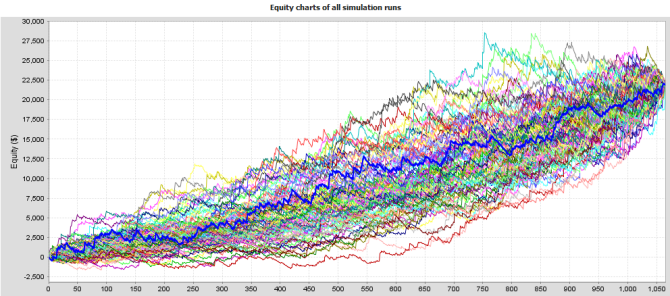
By simply reshuffling the trades your final profit will stay the same, but your drawdown can change a lot. Instead of drawdown 10% you might end with drawdown 30% just by changing the order of the trades. So which value should you trust? What should you expect in the future? 

The answer lies in statistics, which is the basics of Monte Carlo. You can let a program run this reshuffling a hundred times and you'll see what is the best, worst and average drawdown achieved during these random runs.

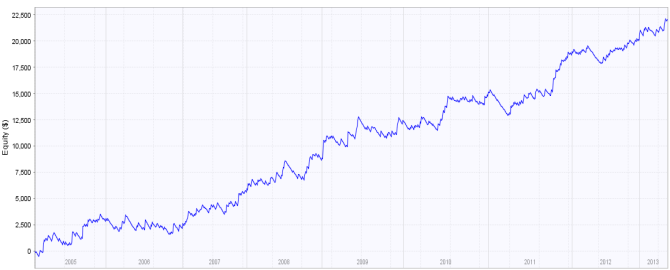
Take the following system: 


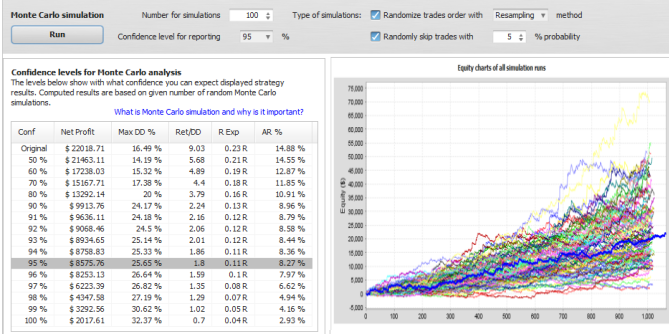
Below is 100 diffrent equities of the same system. All we did was change the order of trades.  


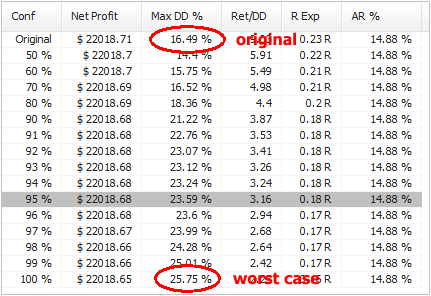
And here are some system performance statistics:


The system that originally had drawdown around 16 % now in worst case has drawdown 26 %, almost a double. 

What do these values mean?
It is quite simple. The first line is result for original
http://www.quantstrategyea.com/#a607174
strategy, the rest are confidence levels computed using Monte Carlo analysis. Numbers on the left are confidence levels - they tell us with what confidence (probability) we can expect the resuts to be same or better than in a respective line.

For example, values at 95 % confidence level mean that there is 95% chance that Net Profit, Drawdown, etc. will be same or better than the confidence level values.

In other words, there's only 5% probability that drawdown will be worse than 23.59 %. 


95 % is the usual confidence level to consider. You could realistically expect that your system results will be same or better that values in this confidence level.


What properties can be tested in the Monte Carlo analysis?
When we work with the backtest results all we have is a list of trades in the history. What can we do with them? 

Changing Trades Order

http://www.strategyquant.com/tickdatadownloader/#a607174
In the Exact variation it only randomly shuffles order of the trades. This doesn't change the resulting Net Profit, but it is very useful in examining different variations of Drawdown that can be a result of different order of trades.

In more advanced Resampling variation of this test the trades are not just shuffled. Instead the program randomly picks total number of trades from the pool of all trades in history. The difference is that in this method the list of trades might not be the same. It can pick one trade multiple times and some other trade might not be picked at all. 

This will give yet another view of the system. This method will usually change both Net Profit and Drawdown and it is quite extreme test. 

Skipping Trades

in this test some trades will be randomly missed (with given probability). In real trading you can often miss a trade because of platform or Internet failure, or simply because you paused trading for some time.

This test will give you an idea how the equity curve might look like if some trades are randomly skipped. 


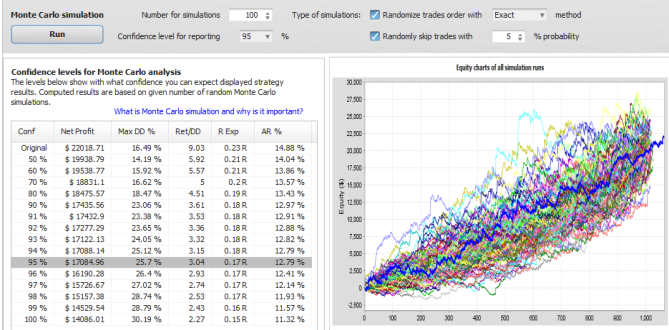
Example 2 - lets randomize the trades and miss 5% of them
You can see the resuts below. Missing 5% trades will slightly increase our expected drawdown at 95% confidence level and it also reduces the expected profit from $22.000 to $17.000.


Example 3 - resampling the trades and miss 5% of them
This is the most extreme test - with trades not only changing order but also resampled and missed 5% trades. The expected drawdown is the same as in previous example, but expected profit at 95% confidence level is decreased to only $8.500. 

Note that this is almost the "worst case" scenario, it means that there's only 5% chance that the profit would be lower than this. 

It can also be higher, if you'll look at the siulations chart you'll see that the simulations equity results have wider range in this case, the final profit ranges from only $2000 to $50.000.

We can hope for the best but be prepared for the worst. 


Practical use of Monte Carlo analysis

This anaysis should be one of the final steps in strategy development. Before you start trading any strategy you SHOULD run a Monte Carlo simulation with at least Exact randomization and 5% trades missed to determine more realistic drawdown and profit expectations. 

What to look for - from my personal experience: 

Expectancy level and number of simulations - it is a good rule of thumb to watch 95% expectancy level and run at least 100 simulations. More simulations will give you more statistical significance and 95% level means that there is only 5% chance that results will be worse than simulated. 

Drawdown - you should watch how much worse is the drawdown at your expectation level compared to the original strategy. If it is less than double it is usually acceptable for me.

If drawdown at 95% level is double or even more than drawdown of original strategy then trading this EA would be dangerous.

It means that it achieved small drawdown in your test mostly by luck and you shouldn't expect the luck to continue in the future. 

Net Profit and other - generally, the strategy should fulfill your expectations. You can expect resuts better than 95% level values, but you can never be sure how much better they'll be.

For example, I wouldn't trade a strategy that would have none or very small small profit at 95% - it means that there's something wrong with the strategy. 


Note: Monte Carlo functionality described above is available in the new EA Analyzer 2
You can use it to run Monte Carlo analysis on your MetaTrader4 backtests or account history statements imported to EAA.


Kamis, 09 Januari 2014

Trading Tip #2: Advanced Method On Making More Than 40-50 pips Consistently with MA Combinations

I wish to appreciate the comments, and encouragements  from users of the first trading tip #1. I decided to speed up the publishing of the advanced method due to high demand from interested users. However we advise traders to completely understand the basics of this system before attempting the advanced method. This is the reason we gave time for practice, and tests before the release of the advanced method.


--> In the first method we were able to prove that PRICE WOULD ALWAYS REACT AT A PARTICULAR AREA, and you can convert the reaction to your favour by setting a price trap within the reaction points.

A simple reaction can earn you at least 40 to 50 pips consistently each time it occurs (all things being equal).

The advanced method reveals some tricks, and tips to increase the profits, and helps to detect the reaction areas clearly. But before we commence i strongly advise you read the first method and practice it with a simulation software (recommended) or demo account until you get a full understanding of the strategy.


KEY POINTS OF THE ADVANCED METHOD
  1. The advanced method primarily increases the profit potential of the strategy.
  2. Additional indicators (optional) would be introduced to aid easier detection of the reaction points, and show best places to set pending orders.

PRACTICE/TESTING MATERIALS
  1. Forex Simulation Software. Forex Tester V2.0 Professional Edition was used to practice and test the
    http://www.forextester.com/idevaffiliate/idevaffiliate.php?id=687
    strategy. You can download a demo version (with limited features) for this lesson before you decide to purchase the full edition.
  2. Offline Chart (30 Mins). We do not necessarily need a demo or live account for this lesson. Right click your chart, and select properties from the menu. Select the common tab, and choose Offline Chart. Click ok.

ADVANCED METHOD OF MAKING MORE THAN 40-50 PIPS
Now lets imagine we have a strategy with 85% to 90% accuracy, and another strategy with 58% to 99% accuracy. It would be better to take more risk or increase our chances with the first strategy because out of every 10 trades we are sure of 85% minimum success compared to 58% minimum success despite its ability of achieving 99% accuracy in some runs. A trading system with 85% to 90% accuracy is worthy of taking risks but with intelligent techniques.

We said before that this strategy detects areas where price MUST REACT, and we take advantage of this reaction no matter how it reacts. This means if we get 50 reactions a day (all things being equal), and we take advantage of them using this tactics, then we should expect 100% positive returns.

The first basic strategy only showed us how to detect the areas, and how to take advantage of it by placing pending orders, but the advanced system would show us some indicators that would strengthen the detection of the reaction points, and how to multiply the profits.


**New - 50% Discount Plus Special Life Time Discount Offers

Advanced Method Step 1: - Eagles Eye Detection
We are going to apply some indicators to strengthen the detection of the areas where price would always react. The basic strategy depended only on the 200 SMA line.

Pic 1


Now we are going to apply some key indicators that would give us clear signals that price is actually playing around the trap area, which is within the 200SMA line. This will help us detect fake setups. 

Force Index Indicator
The force index indicator is grouped under the Oscillator Indicator. It connects the basic elements of market information such as price trend, its drops, and volumes of transactions. This indicator when combined with the Moving Average Indicator produces better results in opening and closing orders (Click to see more about Force Index Indicator).

Open your offline chart and apply the indicator with its default settings. Resize your chart where necessary.

Scroll backwards or forward on your chart history, and look for areas like the picture 1 above where price is crawling along the 200 SMA line. At those areas where price is crawling along the 200 SMA line you will notice that the Force Index Indicator is somewhat on a straight line at the 0.00 level. See illustration below


This means that the volume of transactions with regards to the bulls and bears power is indecisive. This also means that price would eventually breakout either to the bull or bear area. THAT IS THE REACTION. Price would never remain indecisive forever so the Force Index Indicator gives us more confidence to set our trap, and wait for an eventual breakout.

NB: The longer the force index stays at the 0.00 level the better the certainty of the reaction.

GBPJPY 30Mins - 30th August 2013; 19:30


RVI Indicator
The Relative Vigor Index Indicator helps to verify trend, and
https://tradingfxvps.com/whmcs/aff.php?aff=5&url=http://tradingfxvps.com
trend breakout. It is already part of the basic strategy but we are going to see how it will helps us filter the detection.

Take a look at the chart in the same area, and see how the RVI reacts. You'll find out that when price crawls around the reaction areas, the RVI is either fluctuating within the 0.025 level and -0.025 level or on the 0.00 level. Anything outside these levels is not guaranteed. The RVI plays lesser role when compared to the Force Index but its still useful.

In addition to these indicators you can include the Alligator Indicator. The indicator as we know it squeezes around price when it begins to move in a sideways pattern or in a channel due to inactivity. 

Either of these indicators helps to further strengthen the signal that price is actually crawling around the reaction area waiting for an imminent breakout.


Advanced Method Step 2: Multiply The Profit
The primary goal of the advanced method is to multiply the profit potential of this strategy. 

The steps below involves some risks that may not be suitable to some account size, type, and broker. This is why we recommend using a simulation software to practice, and test this method in order to optimize it to your account size and money management rules.

Step 1:
When all conditions are met place 2 pending orders on both sides with different lot sizes. The orders should be placed simultaneously.

For example:
Order 1 - BUY STOP - Lot Size = 10.00
Order 2 - BUY STOP - Lot Size = 20.00
Order 3 - SELL STOP - Lot Size = 10.00
Order 4 - SELL STOP - Lot Size = 20.00

Take profit should be placed in this manner:
1. The higher lot size should have a closer Take Profit setting.
2. The lower lot size can have its TP set farther than the higher lot size or at the same position.

NB: A safer way is to place the higher TP much closer like 10 pips away from the order. But If the signal shows a major reversal or cross then you could increase it. The idea is to catch as fast as possible the immediate reaction with the higher lot size, and consolidate your position with the lower lot size. Take note of FIFO and Hedging rules for brokers situated in the US.

The inherent risk is that price can suddenly counter react against your position hence you should be careful trading the advanced method prior to news release. However our confidence lies on the basis that PRICE MUST REACT and 80% of this reaction showed positive returns if applied accurately.

Warning: Please practice, and perfect this method with a simulation software before applying it to your live account. You will not be able to carryout an extensive practice, and testing of this strategy with a demo account. Also be cautious of your leverage and margin size.

Step 2:
Place 1 (one) single large order rather than placing multiple
orders with different lot sizes. The question is what happens if the order doesn't get to my Take Profit or reverses negatively? Personally i use Trade Management Systems like Managed Take Profit EA to protect my orders from situations like this. The system takes partial take profits from my account, while automatically moving the Stop level till it gets to breakeven.

We've come to the end of the advance method of making more than 40 - 50 pips consistently with MA Combinations. We hope you'll find it useful to your success in Forex. 

We appreciate your feedback, and comments. 


    Jumat, 03 Januari 2014

    2014 - Best Year Ever


    With gratitude to God Almighty for His protection, provision, mercies, and grace, we wish to welcome everyone to 2014 - a year filled with expectations, promises, surprises, positive changes, harvests for hard work, and new things.

    2013 was quite an interesting year. It was the year FXTradeCity was founded, and we are glad we lived to our expectations and goals. Thanks to God Almighty and to you all who made it a success.

    2013 was a year of shocking, and breaking news especially with the big shots in Forex. 
    1. FXDD got fined by CFTC for unilaterally removing clients profits. 
    2. Binary Options also got serious injunctions from CFTC.
    3. InvestTechFX Technologies Incorporated got arrested by Royal Canadian Mounted Police for allegedly defrauding clients millions of dollars
    4. MF Global Inc got one of the record breaking fine of $1 Billion dollars as restitution to their clients, and an imposed fine of $100 Million dollar penalty through a court verdict for their failure in 2011.
    5. Fund Manager - Green Tree found themselves a 97 Months Jail Term and $17 Million to be paid back to clients
    6. One of the big giants in online payment system - Liberty Reserve was shut down, and the founder arrested.
    These and so many other shocking news rocked the FX Market in 2013. 

    2013 also ushered amazing business buy overs, and mergers we never imagined would happen. Blackberry (RIM) sold out its cherished BBM App to the open market mainly to Android Phone Makers due to alleged bleak prospects for its handsets. 

    Nokia Investors approved sales of its handset units to Microsoft unshackling the Finnish company from the unprofitable division, and letting it focus on networks.


    Facebook almost acquired one of their biggest acquisition if they had bought SnapChat but the deal didn't pass through.

    These and so many other shocking mergers, and buy-out occurred in 2013.

    The above shows the deep appetite, and business competition in 2013, which would definitely cause more ripple effects in 2014.


    RESOLUTIONS FOR 2014
    I bet a lot of traders must have resolutions for 2014. However we have a some advice, and tips for this year.
    1. Commit your heart desires for this year into God's Hands, and He'll see you through.
    2. Do not procrastinate this year. Highlight your targets, and get them done timely.
    3. Take the necessary risks, and put away fear because it denied you opportunities in 2013.
    4. Dedicate some of your budget to training software & utilities this year.
    5. Expand your frontiers.
    6. Dont be on the sidelines this year - act.
    7. Grow from your current level to a higher level (Baby trader to Advanced Trader).
    8. Kill all the killing habits, and attitudes this year (greed, laziness, psychological imbalance, e.t.c.).
    9. Resolve to let go off bitterness, and forgive yourself for last year's failures. You are not a failure - Move on.
    10. Do not chase after the wind. It was not worth it last year, be realistic.
    11. Don't forget to signup for our newsletters, and like us on Facebook

    Wish You The Best In Your Forex Investments
    Yours Sincerely

    Obike C. Onyebuchim